Carrier & Broker Operations Platform
Designing an Intelligent Freight Carrier & Broker Operations Platform for Faster Decision-Making
The Freight Carrier & Broker Operations Platform is an enterprise web portal designed to unify carrier onboarding, tender management, live order visibility, document workflows, compliance, geofencing, invoicing, and settlement tracking into one intelligent operational ecosystem.
As Lead Product Designer, I shaped the product strategy, workflow architecture, analytics model, AI-informed opportunities, interface patterns, accessibility standards, and scalable design system across a complex freight lifecycle. The platform helped carrier owners, dispatchers, billing teams, compliance teams, and broker operations make faster, more confident decisions with clearer operational signals.
A centralized decision-making workspace for tenders, active loads, route progress, documents, compliance, risk signals, and settlements.
| Role | Lead Product Designer · Enterprise Systems · AI-Informed Product Strategy |
|---|---|
| Platform | Responsive web portal · Intelligent freight carrier and broker operations ecosystem |
| Users | Carrier owners · Dispatchers · Billing · Compliance · Broker operations |
| Focus | Decision support · Tender workflows · Live visibility · Documents · Settlements · Analytics-informed UX |
Faster load assignments after redesigning the dispatch workflow.
Reduction in driver turnover following improvements to the mobile experience.
Drivers supported through the redesigned mobile application.
Freight broker customers supported through the tracking and booking portal.
Unified onboarding, tenders, orders, documents, compliance, alerts, invoices, and settlements into one connected system.
Structured operational signals to support smarter recommendations, alerts, task prioritization, and workflow automation.
Used behavioral signals, event tracking, and workflow completion data to guide product decisions and identify friction.
Created scalable patterns for tables, filters, status chips, task lists, alerts, financial workflows, and AI-assisted opportunities.
The product challenge was turning fragmented freight workflows into decision-ready intelligence
Carrier and broker operations relied on a complex mix of email, spreadsheets, TMS data, portals, phone calls, manual document review, and payment follow-up. Users needed a single place to understand tender opportunities, order status, compliance requirements, documents, invoices, settlement progress, and operational risk.
The larger product opportunity was to design an intelligent freight operations platform that reduced manual coordination, improved visibility across the freight lifecycle, and created a scalable foundation for self-service, AI-assisted recommendations, automation, and analytics-informed decision-making.
Create a centralized freight operations platform that simplified carrier workflows while giving broker and operations teams the intelligent visibility needed to manage risk, documents, financial outcomes, and next-best actions.
Core product problems
- Tenders, tracking, documents, invoices, and settlement updates were spread across disconnected systems.
- Carrier onboarding and compliance review were manual, slow, and difficult to track.
- Internal teams received repetitive questions about load status, missing documents, and payments.
- Carrier trust in prior portals was low, so reliability and visible value were critical for adoption.
- Different carrier types had different compliance, documentation, and payment rules.
- Operational data existed, but users lacked intelligent prioritization to know what needed attention first.
Shifting the platform from status lookup to intelligent decision support
The product strategy focused on connecting the full tender-to-invoice lifecycle and turning scattered operational data into clear decision-making signals. Instead of treating onboarding, tenders, orders, documents, alerts, and invoices as separate areas, I structured the experience around the real sequence of freight work and the decisions users needed to make at each stage.
Before → After Product Shift
- Carrier work lived across email, spreadsheets, portals, and phone calls.
- Tender requirements were easy to miss or misunderstand.
- Document issues were often discovered late in the billing cycle.
- Payment status required manual follow-up with internal teams.
- Operational alerts were not connected to clear next actions.
- Users had data, but not enough prioritization or intelligent guidance.
- The platform became a shared operational source of truth.
- Tenders, requirements, orders, documents, and payments were connected.
- Document tasks made missing and complete states easier to see.
- Payment timelines and invoice status became self-service.
- Geofence and alert patterns supported proactive risk visibility.
- AI-ready workflows created a foundation for recommendations, smart tasks, and predictive alerts.
Key product decisions
- Design around the freight lifecycle: onboard, review tenders, accept, dispatch, track, document, invoice, and settle.
- Make status decision-ready: use clear status chips, tables, task lists, and alerts to show what needs attention and why.
- Reduce support dependency: surface requirements, document status, payment timelines, and issue paths directly in the portal.
- Support operational density: design data-heavy tables that remain scannable for dispatch, billing, and compliance users.
- Instrument key workflows: track tender views, acceptances, document uploads, invoice submissions, payment questions, and support triggers.
- Prepare for intelligent automation: structure repeatable patterns that could support smart reminders, tender recommendations, and risk-based prioritization.
The platform moved from “find the status” to “understand the work, evaluate the risk, and take the next best action.”
A carrier journey designed around real freight decisions
The platform was organized around the actual lifecycle carriers and brokers manage every day, from onboarding and tender review to order execution, documentation, invoicing, and payment tracking. Each stage was designed to surface the information, risks, and next actions users needed to make confident decisions.
Carrier receives an invitation and completes profile, insurance, and compliance requirements.
- Guided onboarding checklist.
- Progress indicators for required items.
- AI-ready compliance signals for future review automation.
Carrier reviews lane, rate, requirements, timing, and partner fit.
- Saved lane and equipment presets.
- High-signal tender badges.
- Foundation for AI-assisted tender recommendations.
Carrier assigns driver and equipment while confirming requirements.
- Assignment visibility.
- Inline requirement validation.
- Decision support for matching load needs to carrier capacity.
Order status, route progress, ETAs, exceptions, and geofence alerts stay visible.
- Live order timeline.
- Exception and geofence signals.
- Predictive alert opportunities for at-risk freight.
Carrier uploads required documents, submits invoices, and tracks payment status.
- Document task lists.
- Payment and remittance visibility.
- AI-ready document checks and payment explanations.
Mapping emotional friction across the tender-to-pay cycle
The journey map helped identify where carriers needed clearer requirements, stronger validation, better payment transparency, and more confidence in portal reliability. These moments became opportunities for intelligent prompts, clearer decision support, and future AI-assisted guidance.
Carrier sees new tenders, at-risk loads, and invoices needing attention.
Carrier reviews rate, lane, accessorials, timing, and requirements.
Carrier confirms driver, equipment, appointments, and load requirements.
Carrier uploads POD, BOL, invoice files, and supporting documentation.
Carrier submits invoice and confirms expected payment timeline.
Carrier monitors open, paid, overdue, and disputed invoices.
Key platform screens designed for operational clarity and decision-making
Each screen used reusable enterprise patterns to help users scan dense information, identify what needs action, evaluate operational risk, and move through complex freight workflows with less manual follow-up.
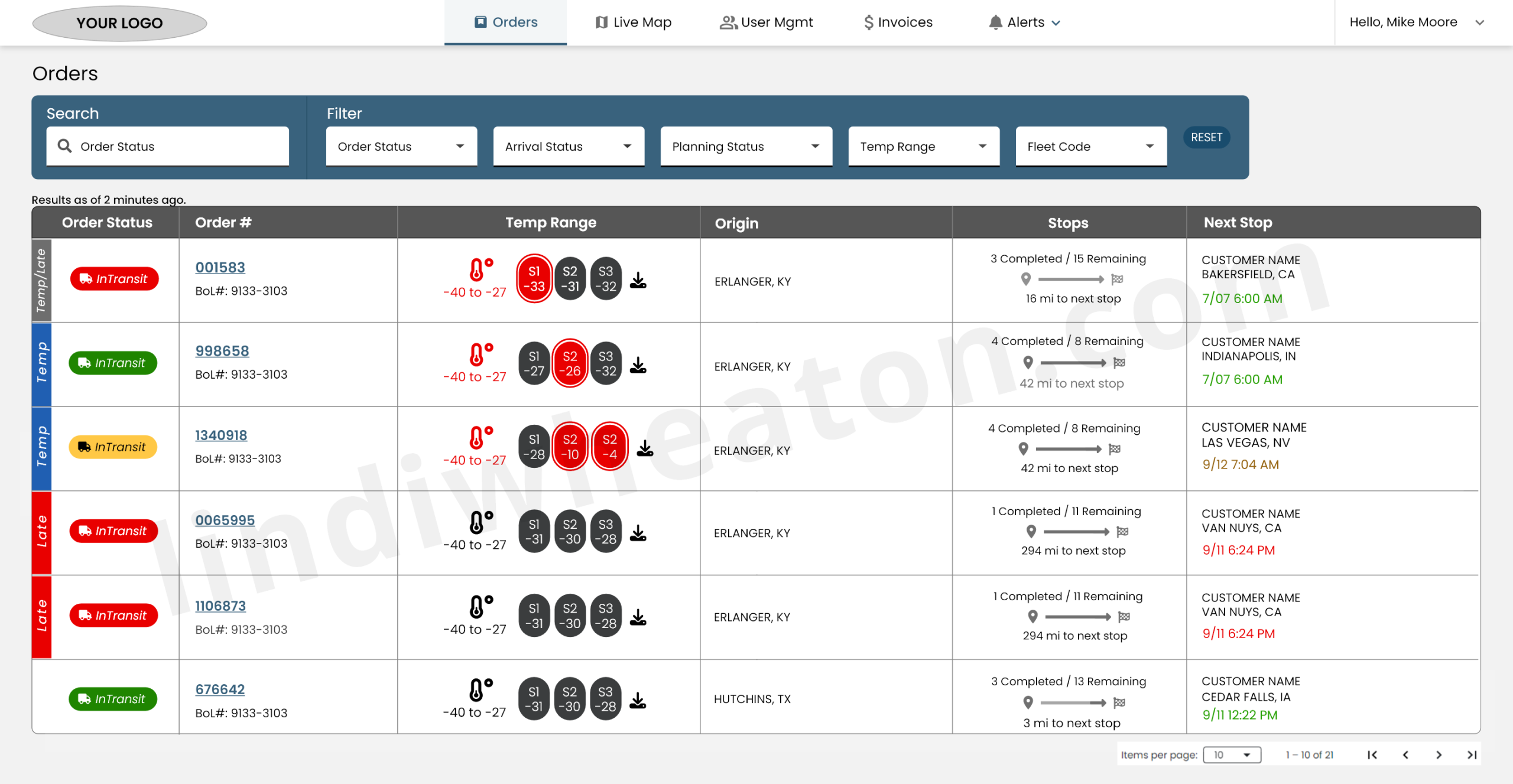
Real-time Orders Overview
The Orders table centralized shipment visibility with status signals, temperature monitoring, stop progression, and filterable operational data. It was designed as a decision layer that helped users quickly identify active, late, incomplete, and at-risk freight.
- Unified view of active, in-transit, late, and completed orders.
- Search and filters for status, fleet, planning state, temperature, and arrival status.
- Clickable order numbers opened full order details, stops, documents, and timeline data.
- AI-ready table patterns created a foundation for risk scoring, smart sorting, and priority queues.
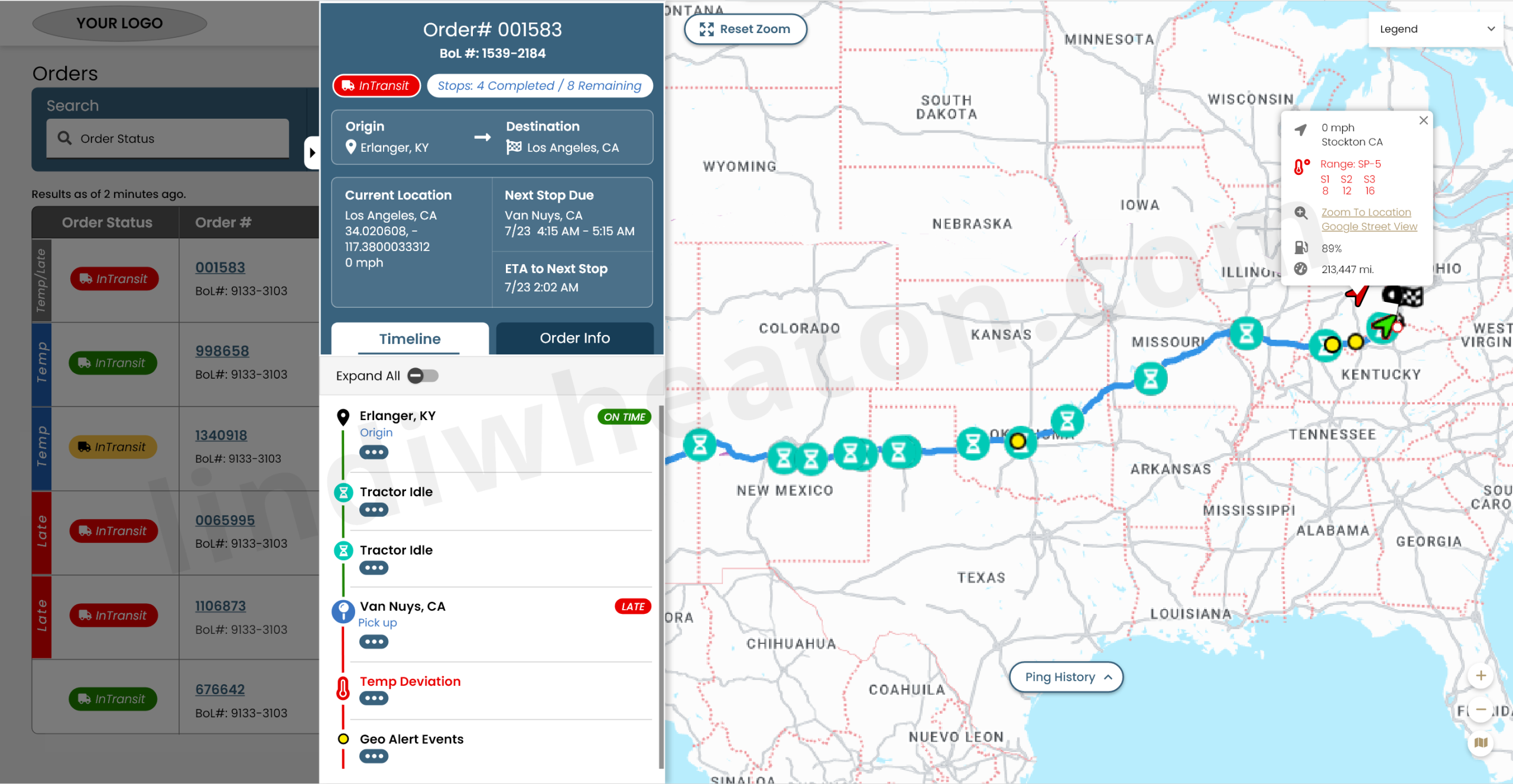
Order Details Slideout
The order slideout brought together timeline events, live map context, route progression, load documents, and exception signals in one high-signal panel. This supported faster decision-making without forcing users to leave the operational table view.
- Chronological events for origin, pickups, arrivals, idle, detention, and deviations.
- Route progression with ETA markers and late or at-risk indicators.
- Quick access to BOL, POD, and required compliance documents.
- Structured signals could support future predictive alerts and recommended next actions.
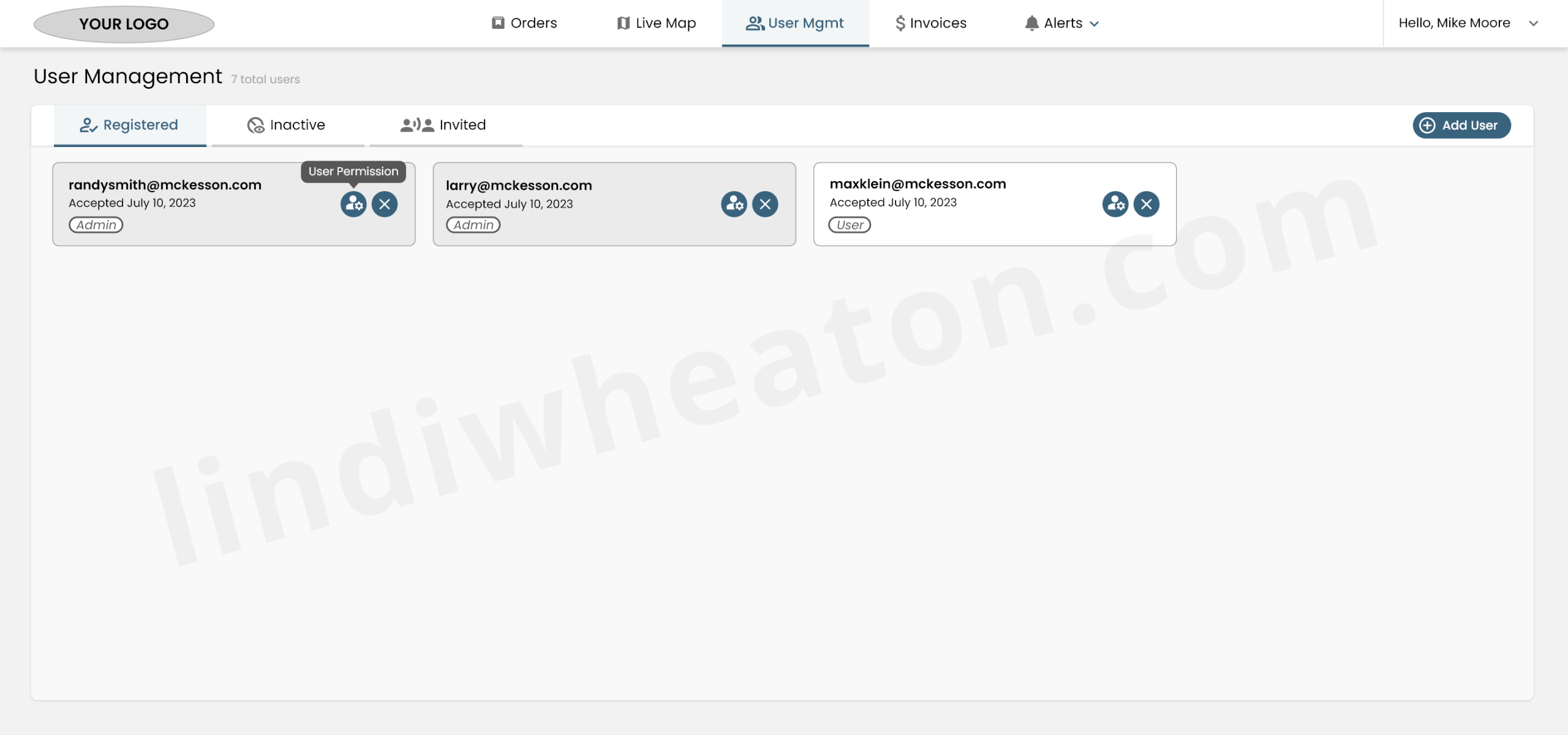
User Management
User Management gave carrier admins clear control over account access, invitations, accepted users, permissions, and role-based visibility.
- Role-based access for Admin and User permissions.
- Invitation status and acceptance date for audit clarity.
- Confirmation patterns helped prevent accidental deletion.
- Permission structure supported scalable enterprise access control across carrier accounts.
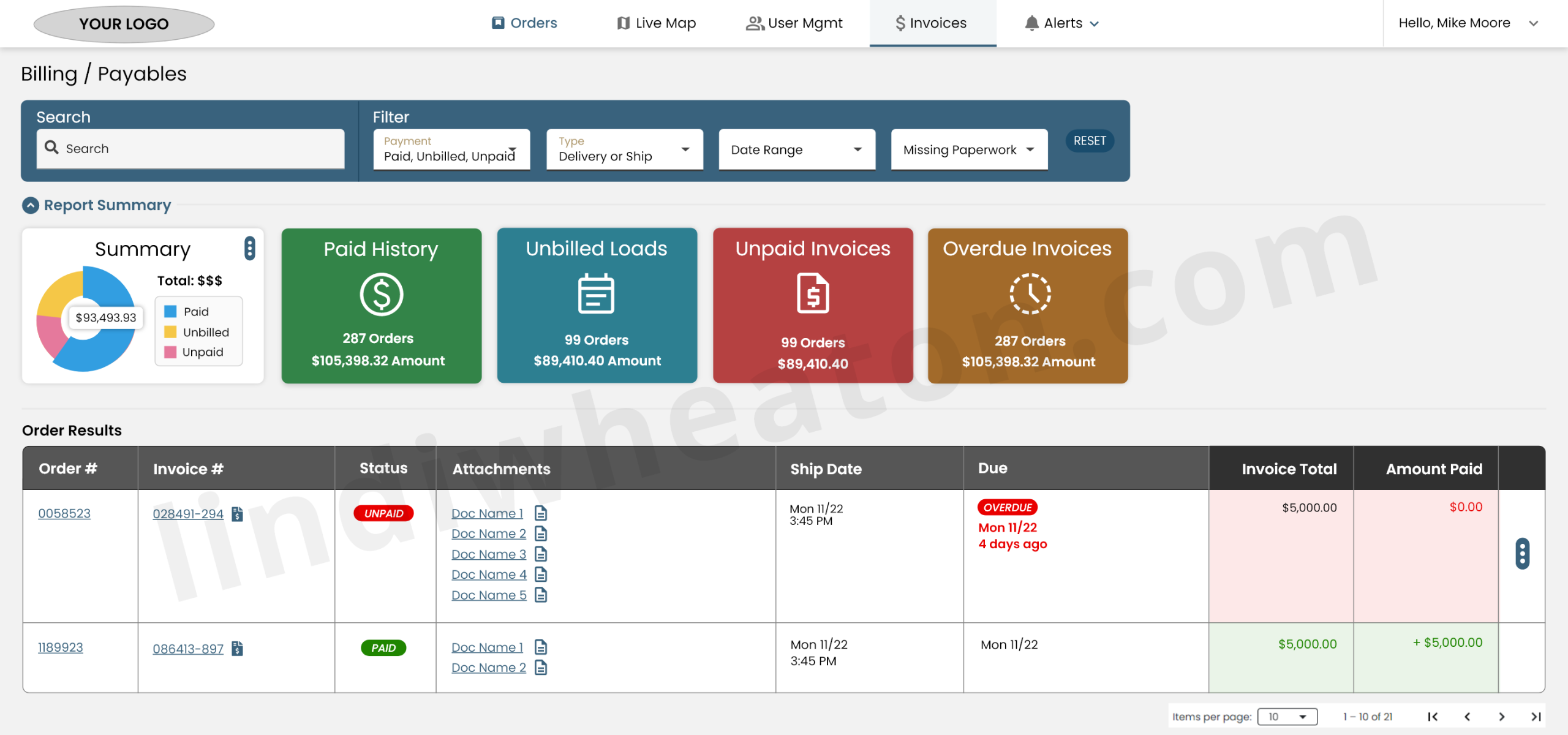
Invoices & Billing
The Billing workspace gave carriers a transparent view of paid invoices, unbilled loads, unpaid balances, attached documents, and payment status. The experience helped turn financial uncertainty into clearer self-service decision-making.
- Universal search across orders, invoices, customers, and documents.
- High-level financial summary for paid, unbilled, and unpaid amounts.
- Expandable rows linked invoices to PODs, BOLs, and supporting files.
- AI-ready financial patterns could support payment explanations, dispute routing, and missing-document detection.
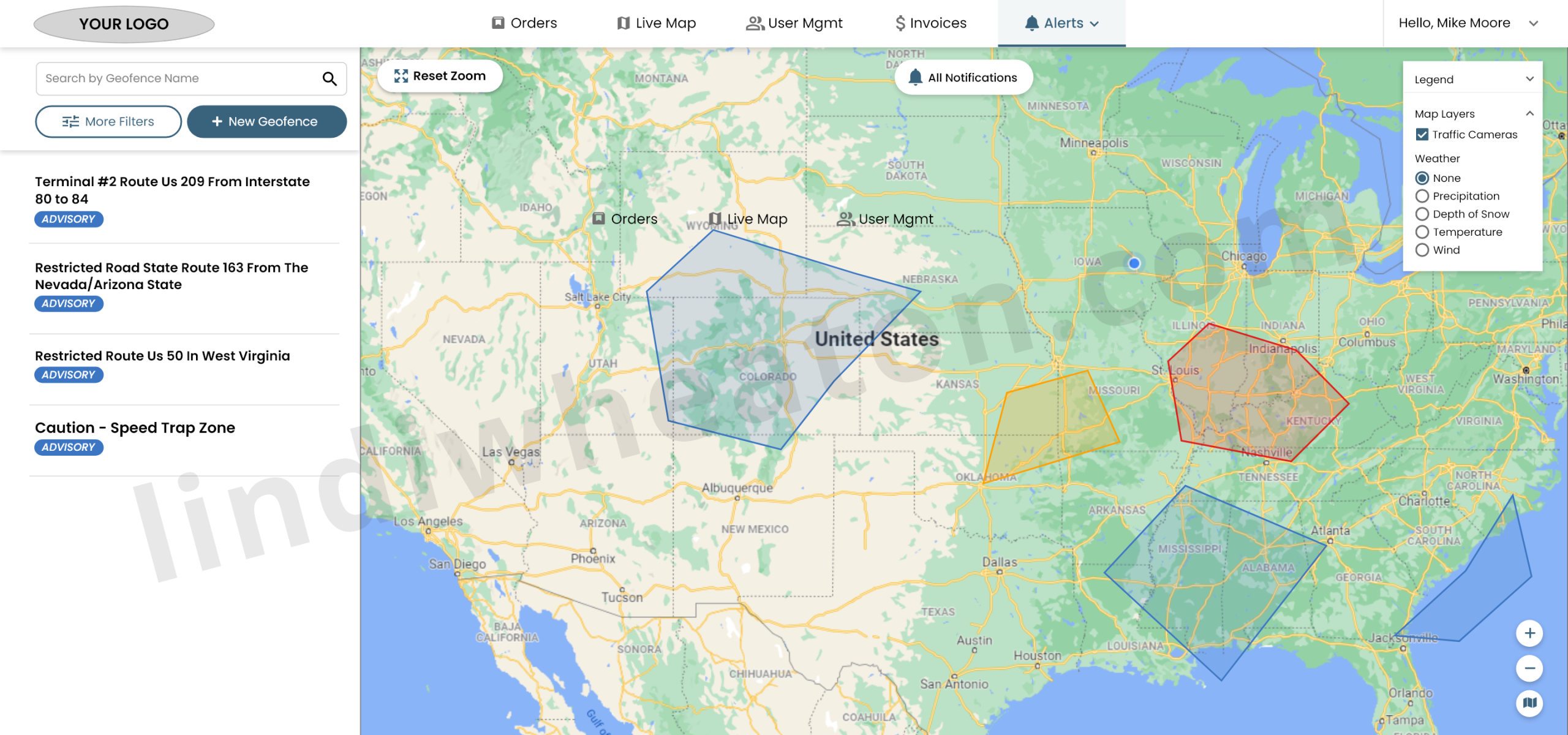
Alerts & Geofences
Geofence Alerts helped operations teams define custom safety, compliance, and routing zones directly on the live map. These alert patterns created a foundation for predictive risk monitoring and intelligent exception management.
- Custom polygon drawing with flexible drag-and-drop anchors.
- Restricted route, safety, weather, and compliance zones surfaced earlier.
- Map layers supported deeper operational context for exceptions and route risk.
- Alert logic could support future prioritization based on risk, severity, location, and delivery impact.
Using behavioral signals to shape intelligent freight operations
I defined an event model that connected user behavior to operational outcomes across tenders, orders, documents, invoices, payments, and support activity. These signals helped expose friction, guide product decisions, and identify AI solutions that could reduce manual effort across the freight lifecycle.
These signals helped identify where intelligent systems, smart tasks, automated reminders, predictive alerts, and self-service workflows could reduce manual effort.
AI solutions and intelligent workflow opportunities
- Tender recommendations: rank tenders by lane, rate, equipment, timing, historical acceptance patterns, and carrier fit.
- Document intelligence: detect missing, incomplete, mismatched, or low-quality documents before invoice submission.
- Smart reminders: trigger document, invoice, or compliance tasks based on order lifecycle events.
- Predictive alerts: surface at-risk loads using route, geofence, temperature, delay, and stop progression signals.
- Payment explanations: provide “why this changed” context for payment timelines, deductions, disputes, or missing documentation.
- Decision support queues: prioritize tenders, exceptions, document tasks, and payment issues based on urgency and business impact.
End-to-end product outcomes
Each stage of the freight lifecycle connected product improvements to measurable operational value while creating a stronger foundation for intelligent systems, automation, and AI-supported decision-making.
| Journey stage | Product improvement | Impact & KPIs |
|---|---|---|
| Onboard & profile | Guided onboarding checklist with progress indicators, structured company profile, contact roles, and validation for required documents. |
|
| Tenders & assignment | Prioritized tender list with filters, badges, lane presets, and requirement visibility before acceptance. |
|
| Docs & compliance | Per-load document tasks, upload status, missing/complete states, reminders, and document-linked invoice readiness. |
|
| Invoices & pay | Structured invoice submission, payment status views, and issue routing tied to specific loads and invoices. |
|
Event-driven process tracking for intelligent product decisions
I used event tracking to identify where users completed tasks, dropped off, repeated actions, or needed support. This helped connect product decisions to actual workflow behavior and created structured signals that could support intelligent automation.
| Workflow | Events defined | What it revealed | Product response |
|---|---|---|---|
| Tender review |
tender_view, tender_details_view, tender_accept, tender_decline
|
Drop-off after tender details showed where requirements, penalties, or appointment context were unclear. | Reordered tender hierarchy and surfaced requirements, accessorials, timing, and fit indicators earlier. These signals could also support AI-assisted tender ranking. |
| Documents |
doc_upload, doc_error, doc_complete, invoice_start
|
Document errors and invoice drop-off correlated with unclear requirements and missing validation. | Added task lists, missing/complete states, validation, and clearer document requirements. This created a foundation for document intelligence and automated checks. |
| Payments |
payment_view, payment_filter, payment_issue_start, payment_issue_submit
|
High issue starts showed unclear payment timelines or remittance details. | Improved payment transparency and simplified issue routing with invoice and load context attached. These patterns could support AI-generated payment explanations. |
| Alerts |
alert_view, geofence_create, map_layer_toggle, exception_open
|
Alert engagement helped reveal which operational signals were useful versus noise. | Refined geofence alert priority, map layers, and exception visibility. This created opportunities for predictive risk alerts and intelligent exception queues. |
Accessibility for dense operational interfaces
Accessibility decisions focused on readable data tables, keyboard navigation, clear focus states, form validation, and responsive layouts for operations users working across large monitors, laptops, and tablets. These patterns helped ensure intelligent systems remained understandable, usable, and trustworthy.
| Area | Standard | Status | Notes |
|---|---|---|---|
| Color & contrast | WCAG 2.2 AA | Met | High-contrast table and card themes for dense operational data. |
| Keyboard navigation | 2.1.1 | Met | Core workflows support keyboard navigation and visible focus states. |
| Semantics & labels | ARIA / HTML | Met | Tables, filters, forms, and buttons use semantic markup and descriptive labels. |
| Error handling | 3.3.x | Met | Inline errors explain missing data, invalid uploads, and incomplete submissions. |
| Future improvements | Robustness | Review | Planned work on table personalization and low-vision display preferences. |
Designing intelligent enterprise platforms that simplify complex freight workflows
I design scalable enterprise products, workflow-heavy platforms, and analytics-informed interfaces that improve visibility, reduce friction, and support faster decision-making across complex operational environments.