Dispatch Operations Platform
Designing operational systems for freight visibility, coordination, and faster decision-making
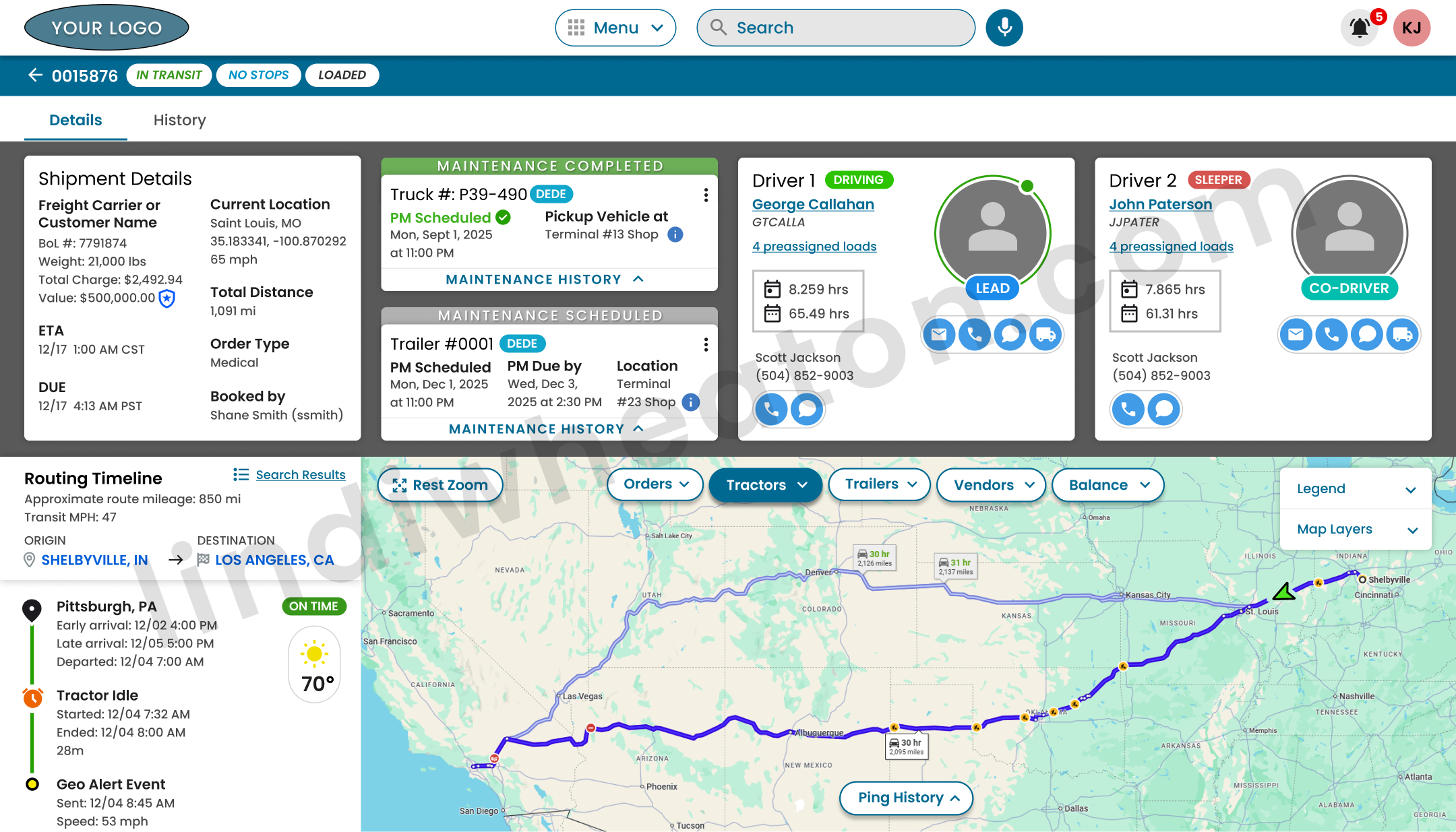
The platform connected real-time freight visibility, driver coordination, equipment tracking, route management, exception handling, and intelligent workflow prioritization into one scalable enterprise ecosystem designed for faster coordination and proactive decision support.
As Lead Product Designer, I led the platform experience strategy across live system visibility, workflow orchestration, multi-role architecture, intelligent systems, and scalable enterprise patterns supporting Dispatch, Operations, Safety, HR, Sales, and Driver Support teams.
| Role | Lead Product Designer · Enterprise Product Strategy · Intelligent Systems |
|---|---|
| Platform | Enterprise dispatch and operational intelligence ecosystem |
| Users | Dispatch · Operations · Safety · HR · Sales · Driver Support |
| Focus | Operational decision-making · AI-assisted systems · Workflow orchestration · Platform scalability |
Led product experience strategy across complex operational workflows and multi-role platform needs.
Designed interfaces that helped teams understand priority, risk, ownership, and next best action.
Accounted for changing freight status, equipment visibility, data latency, and exception conditions.
Connected dispatch, safety, HR, sales, operations, and driver support into one scalable experience.
Improved load assignment speed through clearer workflows and reduced system switching.
Unified data across loads, drivers, tractors, trailers, vendors, and documents.
Used behavior signals, search patterns, and workflow friction to guide product decisions.
Built reusable product patterns for future modules, roles, dashboards, and intelligent workflows.
The challenge was not simply improving screens. It was designing a smarter operational system.
Dispatch teams worked in a high-pressure environment where freight status, driver availability, route timing, equipment location, documentation, and exceptions could change throughout the day. Users needed to make fast decisions while moving across disconnected systems, manual notes, calls, emails, and spreadsheets.
The product opportunity was to create a centralized enterprise platform that could reduce cognitive load, expose live operational states, support decision-making under pressure, and create a foundation for AI-assisted systems and intelligent workflow automation.
The goal was to organize operational complexity into clear states, connected product objects, reusable workflows, and faster decision paths.
Core product problems
- Users lacked a single source of truth for loads, drivers, equipment, documents, and exceptions.
- Operational decision-making depended on fragmented information across multiple systems.
- Live system complexity made it difficult to understand priority, risk, and ownership.
- Different roles needed shared visibility without overwhelming every user with the same data.
- The platform needed scalable product patterns that could support future AI-assisted workflows.
Designing around decisions, not just data
The product strategy evolved the platform from a simple lookup tool into a decision-support system. Rather than adding more information to the interface, I focused on helping users quickly identify what mattered most, what required action, and where operational risk was emerging.
Before → After Product Shift
- Users searched across multiple systems to build context.
- Dispatch decisions relied on memory, manual follow-up, and tribal knowledge.
- Exceptions were often discovered reactively.
- Search required exact system terms.
- Operational data lacked a clear decision hierarchy.
- Dashboards surfaced priority work, risk, and operational state.
- Loads, drivers, equipment, documents, and exceptions became connected product objects.
- Risk states were easier to identify earlier in the workflow.
- Search supported shorthand, lanes, partial identifiers, and status phrases.
- The interface supported faster decision-making with clearer next steps.
Decision-making capabilities
- Priority visibility: helped users identify late, unassigned, missing-document, and at-risk work.
- Contextual hierarchy: organized load, driver, route, document, and exception data around user decisions.
- Action clarity: reduced uncertainty around what to review, assign, monitor, escalate, or resolve.
- Risk recognition: made operational risk easier to scan before it became a larger service issue.
- Shared context: supported better coordination across dispatch, operations, safety, and support teams.
Connecting people, systems, data, and actions into one operational ecosystem
The platform needed to support multiple teams working from shared operational data while still providing each role with the appropriate level of visibility. I structured the experience around connected system objects, role-based dashboards, shared operational states, and scalable workflow orchestration patterns that improved coordination across departments.
Designing intelligent dashboards for faster decision support across enterprise teams
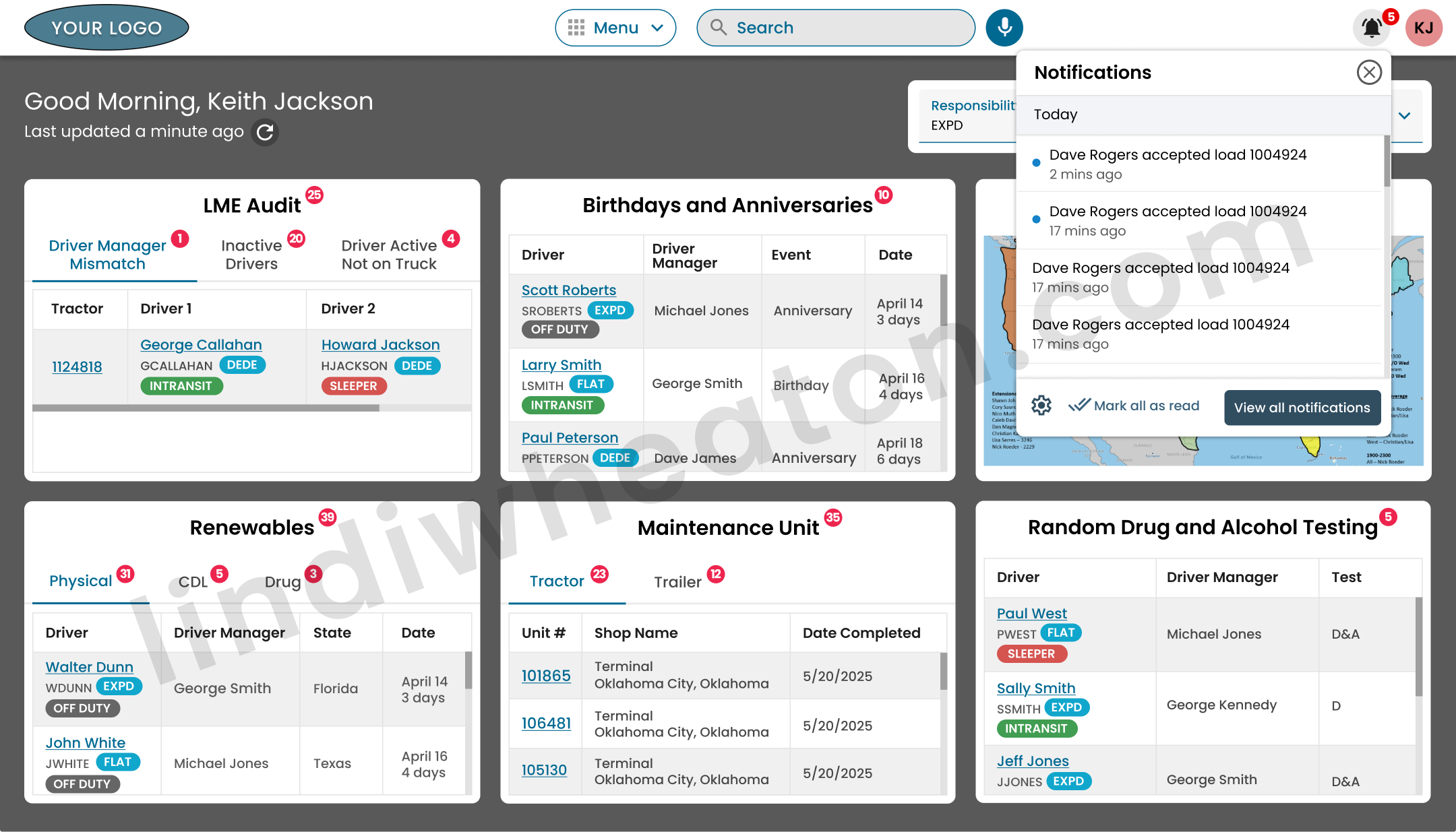
The platform transformed fragmented workflows into a connected enterprise visibility system that helped teams monitor live system conditions, understand workflow priority, coordinate across departments, and move into action faster. The experience focused on intelligent prioritization, shared system awareness, and multi-role architecture supporting Dispatch, Safety, Operations, HR, Leadership, Sales, and Driver Support teams.
Real-Time Visibility
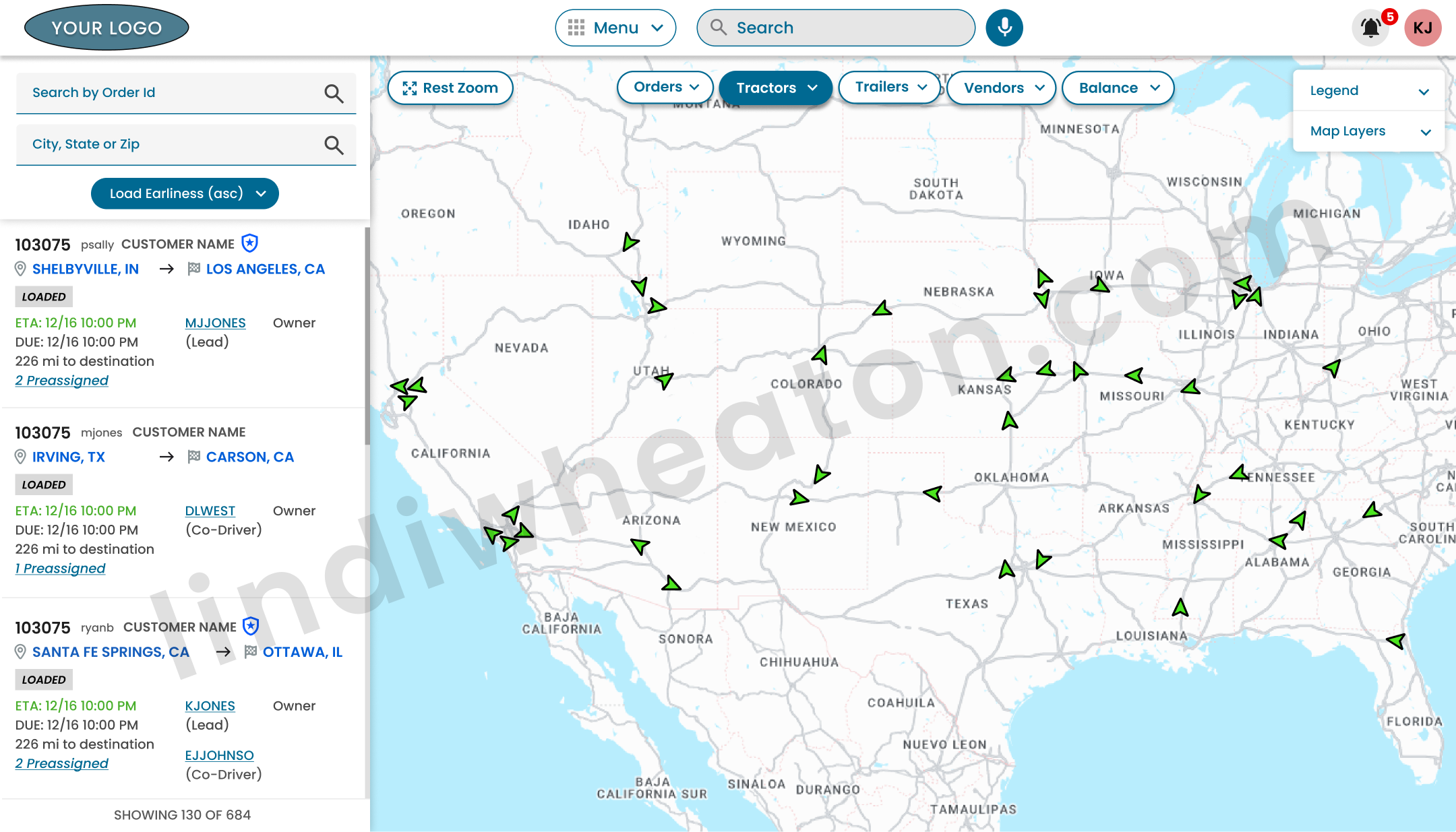
Dashboard experiences provided shared real-time visibility into freight movement, equipment availability, route conditions, staffing activity, shipment status, and workflow progress so teams could understand changing system conditions faster and coordinate decisions from one connected enterprise view.
Intelligent Prioritization
Intelligent prioritization patterns surfaced delayed shipments, at-risk freight, route conflicts, inactive movement, assignment gaps, missing documents, and unresolved workflow issues earlier to support proactive coordination instead of reactive problem resolution.
Shared System Awareness
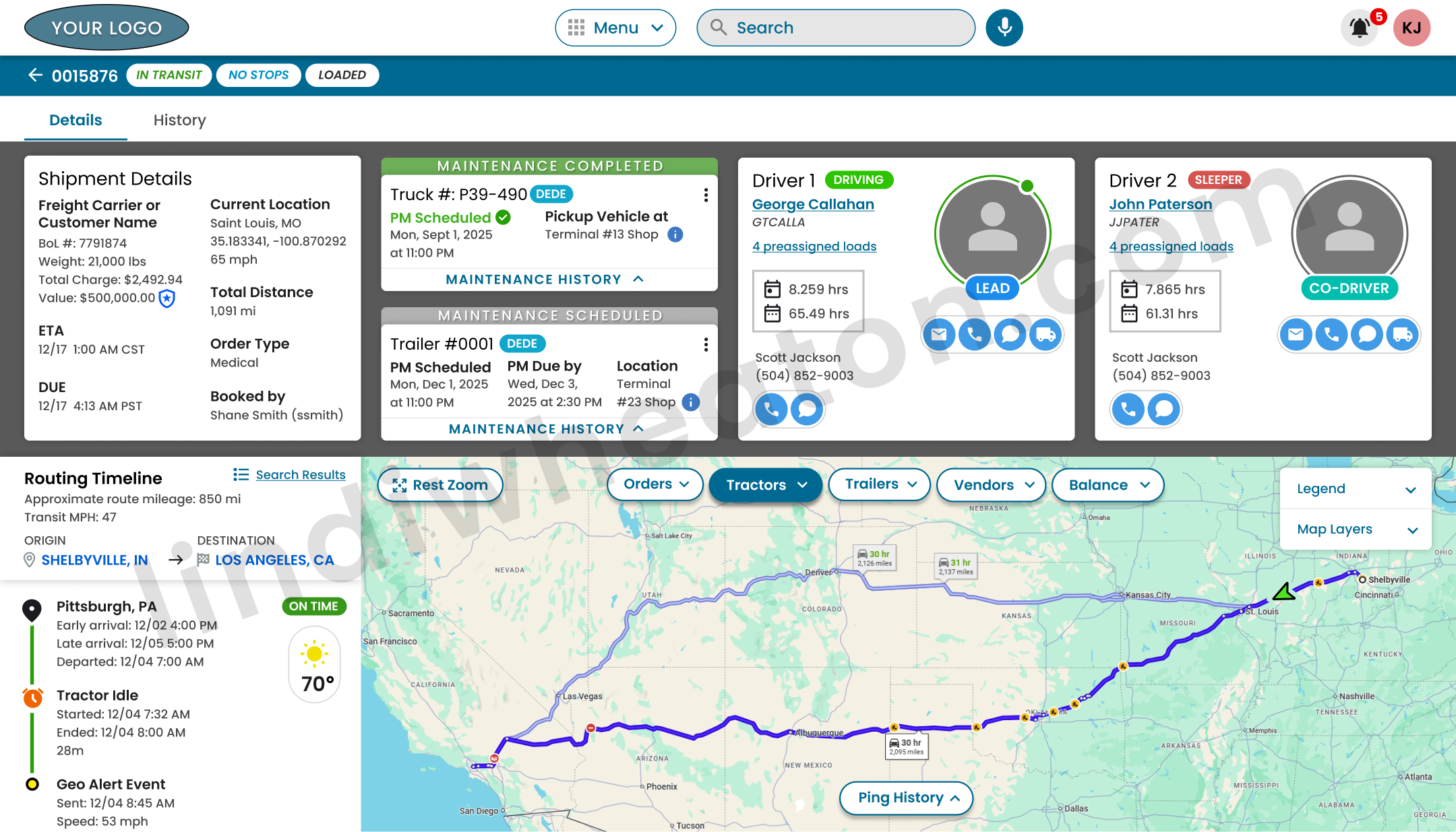
Shared system awareness improved coordination between Dispatch, Operations, Safety, HR, Sales, Leadership, and Driver Support by creating connected visibility around shipment status, ownership, customer impact, communication history, and next best action.
Workflow Coordination
Connected workflow architecture streamlined assignment management, escalation handling, communication flows, staffing visibility, issue resolution, and enterprise coordination across complex transportation workflows.
Route Management
Real-time route visibility helped teams monitor route conditions, delay patterns, inactive shipments, ETA changes, bottlenecks, and route risk earlier so users could improve predictability, delivery reliability, and customer service quality.
Connected Enterprise Objects
Loads, drivers, equipment, documents, conversations, route activity, facilities, staffing visibility, and workflow actions were connected through deep-linked product relationships designed to support scalable enterprise coordination and future intelligent system capabilities.
Designing intelligent visibility systems for real-time coordination and proactive decision support
The interface system helped teams quickly scan freight, driver, equipment, route, and exception data while understanding workflow priority, ownership, shipment status, and next best action. Live system visibility was organized around multi-role architecture, intelligent prioritization, and connected workflow coordination so users could focus on the information most relevant to their responsibilities.
This created a shared enterprise view where Dispatch, Safety, Operations, HR, Sales, Leadership, and Driver Support teams could work from the same system context while making faster, more informed decisions across complex workflows.
Multi-Role Architecture
Dashboard experiences adapted information density, visibility, and actions based on team responsibilities. Dispatch needed freight movement and assignment clarity, Safety needed incident and risk visibility, HR needed staffing context, Sales needed customer and service visibility, and leadership needed system-level performance signals.
Intelligent Prioritization
Priority patterns helped teams focus on delayed loads, missing PODs, assignment gaps, equipment conflicts, stale updates, route issues, and high-risk workflow conditions before they escalated into larger service problems.
Workflow Coordination
Connected workflows improved collaboration between Dispatch, Operations, Safety, HR, Sales, and Driver Support by giving each team shared context around load status, ownership, risk, communication history, and next action.
Smart Result Context
Search and result rows included connected details for drivers, units, freight, route timing, equipment, workflow ownership, and system status so users could compare options quickly and reduce decision errors.
Live System States
Real-time status indicators helped teams recognize changing freight conditions, delay patterns, route risk, incomplete records, stale data, bottlenecks, and escalation triggers across complex enterprise workflows.
Connected Enterprise Objects
Loads, drivers, equipment, documents, messages, exceptions, locations, and workflow actions were connected through deep-linked product objects, creating a more scalable foundation for enterprise platform growth.
Creating a foundation for intelligent systems that support faster, more informed operational decisions.
Analytics helped translate workflow behavior into product direction. Search patterns, repeated actions, no-results behavior, exception views, and assignment flows revealed where users needed better context, faster paths, and smarter operational support.
These signals supported opportunities for smarter queues, predictive alerts, recommended matches, workflow nudges, and AI-assisted prioritization.
AI-assisted product opportunities
- Search intelligence: support lane shorthand, partial names, truck numbers, customer nicknames, and operational status phrases.
- Smart queues: prioritize late, unassigned, missing-document, and high-risk work.
- Recommended matches: support driver-load pairing based on lane, availability, equipment, timing, and risk.
- Predictive alerts: identify operational issues before they become service failures.
- Workflow nudges: guide users toward the next best action during time-sensitive work.
Building scalable product patterns for complex enterprise workflows
The platform needed reusable patterns that could support new modules, additional roles, future analytics layers, and AI-assisted capabilities without creating inconsistent experiences.
Reusable Tables
Structured dense operational data with consistent sorting, filtering, scanning, status, and action patterns.
Status Chips
Created consistent visual language for late, at risk, unassigned, missing documents, delayed, and completed states.
Filter Systems
Supported role-based filtering by terminal, lane, driver, equipment type, status, geography, and priority.
Dashboard Modules
Designed modular cards and widgets that could adapt across dispatch, safety, operations, HR, and leadership views.
Empty & Edge States
Accounted for loading, missing, delayed, partial, stale, or unavailable operational data.
AI-Ready Patterns
Structured queues, alerts, recommendations, and next-action areas to support future intelligent system capabilities.
Impact and product outcomes
The platform improved operational visibility, simplified complex workflows, and created a scalable product foundation for analytics-informed prioritization and future AI-assisted operational intelligence.
Operational Efficiency
- Reduced context switching across disconnected tools.
- Improved speed of load assignment and operational lookup.
- +18% improvement in load assignment speed.
Decision Clarity
- Improved visibility into live operational state.
- Surfaced risk, exceptions, and status changes earlier.
- Created clearer paths for high-pressure dispatch workflows.
Platform Scalability
- Supported multi-role architecture across enterprise teams.
- Created reusable patterns for future product areas.
- Established a foundation for AI-assisted systems and intelligent workflows.
Designing intelligent systems that simplify complex work
I design scalable enterprise products, workflow-heavy platforms, AI-assisted systems, and analytics-informed interfaces that improve visibility, reduce friction, and support better decision-making across complex operational environments.