Intelligent Freight Operations Platform
Track Freight: Intelligent Freight Operations Platform
A product design exploration for an intelligent freight operations platform focused on visibility, workflow prioritization, routing intelligence, and decision support.
The concept shows how freight teams could move from fragmented updates and reactive coordination toward a connected system that helps users understand what changed, what needs attention, and what action comes next.
| Project | Track Freight · Intelligent Freight Operations Platform |
|---|---|
| Type | Ongoing product design exploration |
| Role | Product Strategy · UX Research · Interaction Design · UI Design · Product Vision |
| Users | Dispatchers · Operations Teams · Fleet Managers · Driver Support · Leadership |
| Focus | Operational Visibility · Routing Intelligence · Workflow Prioritization · Decision Support |
Reframing freight operations around visibility, priority, ownership, and action.
Organizing the experience around review, assignment, monitoring, and escalation.
Bringing shipment, route, driver, equipment, customer, and risk signals together.
Exploring predictive alerts, smart queues, recommendations, and routing support.
Operational teams often make critical decisions using fragmented information.
Freight teams may have access to data, but still need a faster way to understand status, risk, priority, ownership, and next action.
Disconnected context
Shipment, route, driver, equipment, and customer information often lives across separate tools.
Late exception awareness
Teams may discover route risk, missing documents, or delivery issues after disruption has already started.
Manual prioritization
Users spend time figuring out what matters first instead of acting on the highest-risk work.
Transforming operational data into operational understanding
The opportunity was not to design another dashboard. It was to create a decision-support model that helps users move from signal to action.
Visibility
Connect freight, route, driver, equipment, customer, and risk information into one shared view.
Prioritization
Surface the most important work first instead of requiring users to manually search for issues.
Decision Support
Provide context that helps users evaluate options, understand tradeoffs, and act with confidence.
Freight operations depend on decisions across changing conditions.
Transportation teams manage route changes, equipment availability, driver status, delivery windows, customer expectations, documentation requirements, and service exceptions.
Track Freight focuses on turning operational complexity into a clearer system of priority, ownership, risk, and next action.
Core product problems
- Faster visibility into shipment status, route risk, and assignment gaps.
- Clearer prioritization when many exceptions compete for attention.
- Shared operational awareness across dispatch, fleet, support, and leadership.
- Flexible patterns that can support intelligent recommendations over time.
Designing around operational behavior, not interface patterns
The concept is grounded in transportation, logistics, dispatch, fleet management, and driver-facing workflow experience.
Workflow analysis
Identify moments where users review, assign, monitor, or escalate work.
Decision mapping
Define what context users need before making freight decisions.
Information architecture
Organize around priority, risk, status, ownership, and next action.
Interface concepts
Explore dashboards, smart queues, route comparisons, and decision panels.
Future-state patterns
Extend the system into predictive alerts and explainable recommendations.
Working assumptions
- Users need answers faster than they need more data.
- Operational priorities change continuously.
- Visibility and prioritization improve decision quality.
- Recommendations must be explainable to be trusted.
- AI should support human decision-making rather than replace it.
Design lens
The interface should reduce interpretation effort by making important signals visible, understandable, and actionable.
Designing around decisions, not just dashboards
Track Freight organizes operational data around the decisions teams need to make throughout the day.
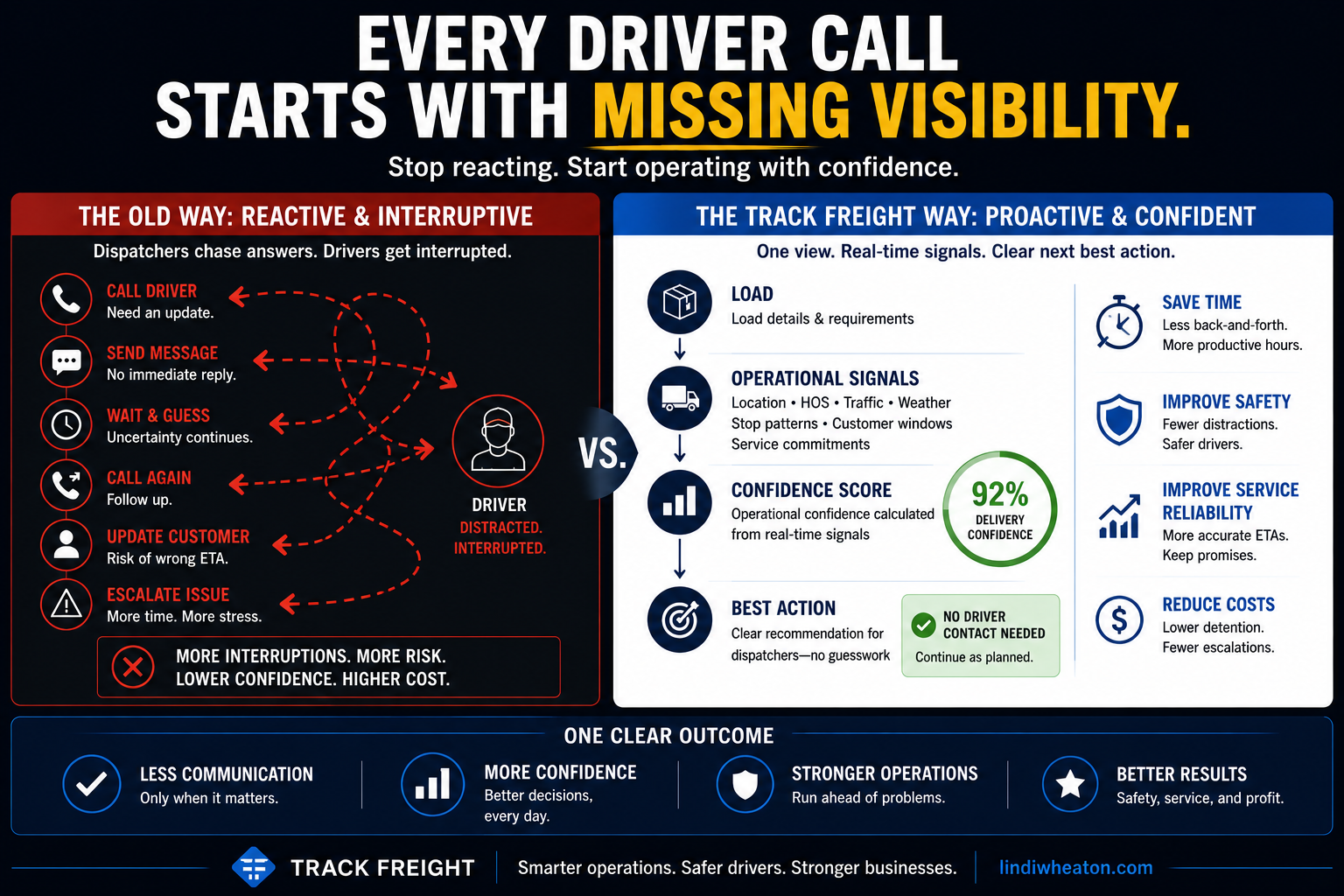
- Manual context gathering
- Priority based on memory and follow-up
- Exceptions found late
- Dashboards show data without guiding action
- Connected operational context
- Priority surfaced through signals
- Risk identified earlier
- Interface guides review, assignment, monitoring, or escalation
Faster understanding of shipment status and operational risk.
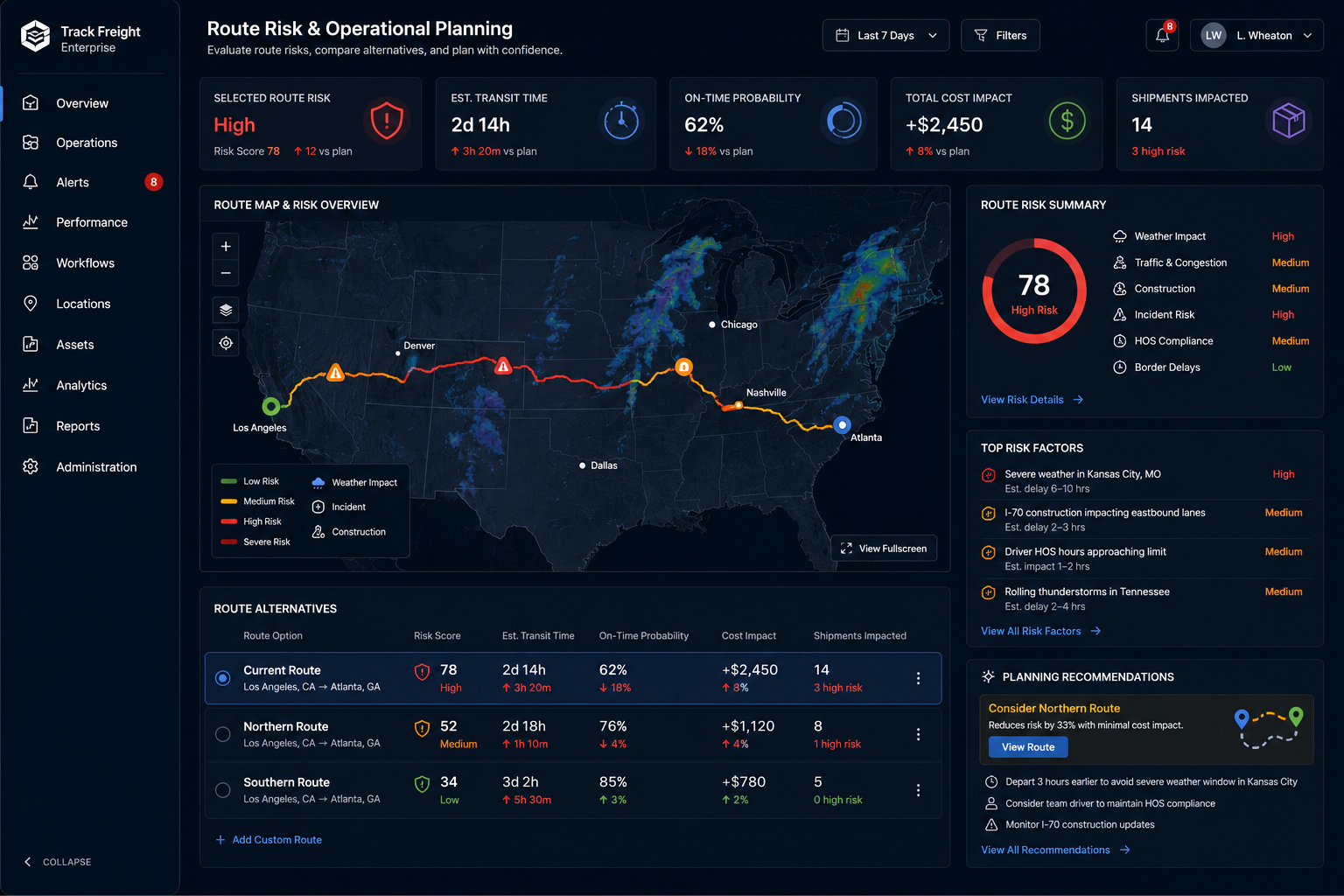
Clearer route tradeoffs across timing, risk, and constraints.
Less manual searching for the work that needs attention first.
More context around why a recommendation or action matters.
Product principles guiding the platform
Decision Support
Organize information around operational decisions, not isolated screens.
Workflow Visibility
Show status, ownership, risk, and next action in the same working view.
Intelligent Prioritization
Surface what requires attention first so users can act faster.
Explainable Recommendations
Help users understand why a route, match, or action is suggested.
Connected Context
Bring route, freight, driver, equipment, and customer signals together.
A shared operational layer for multiple roles
Current product concepts
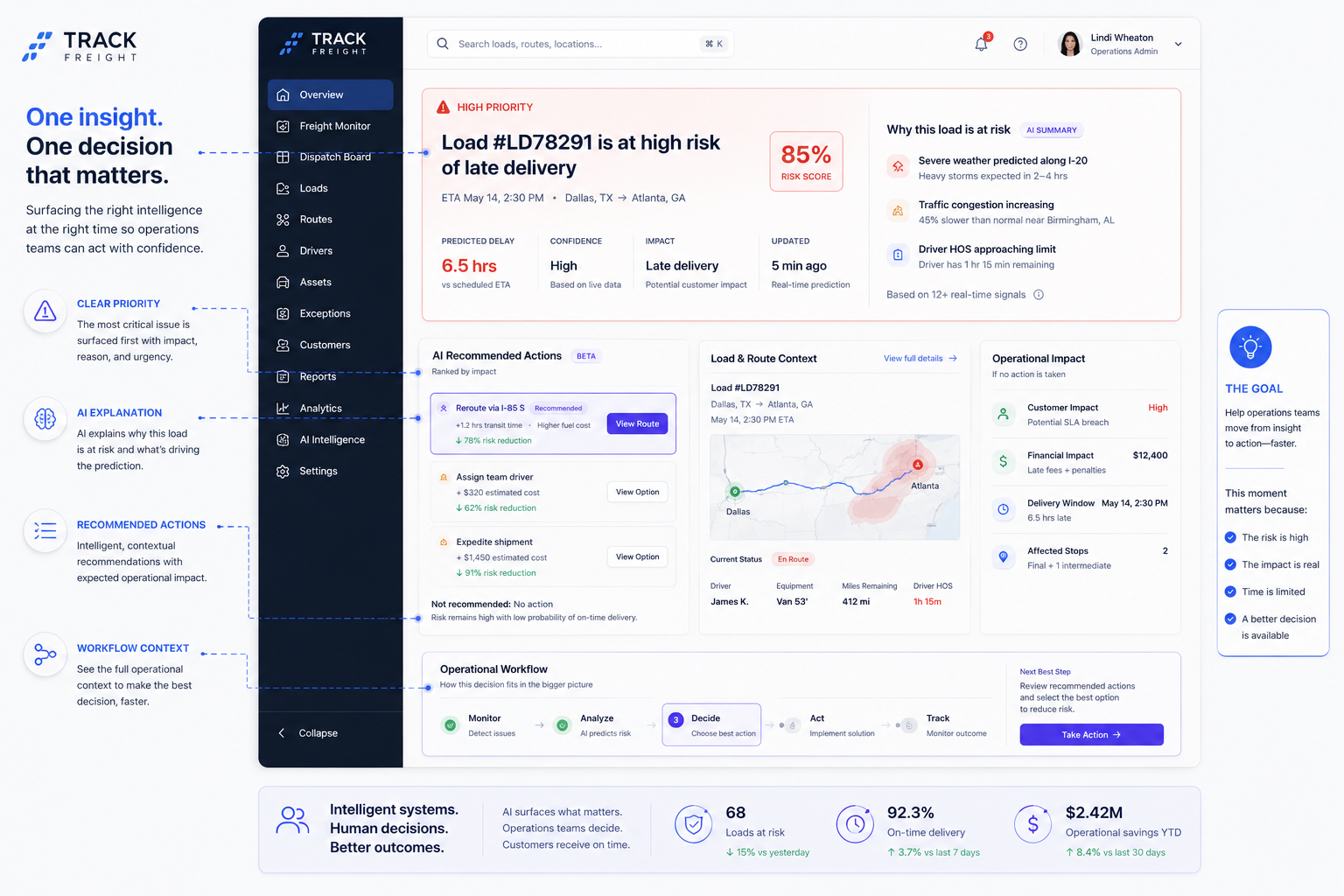
These screens show how visibility, prioritization, routing intelligence, and decision support could work together inside a connected freight operations platform.
Exception Management
Prioritized exceptions grouped by risk, owner, age, and recommended next step.
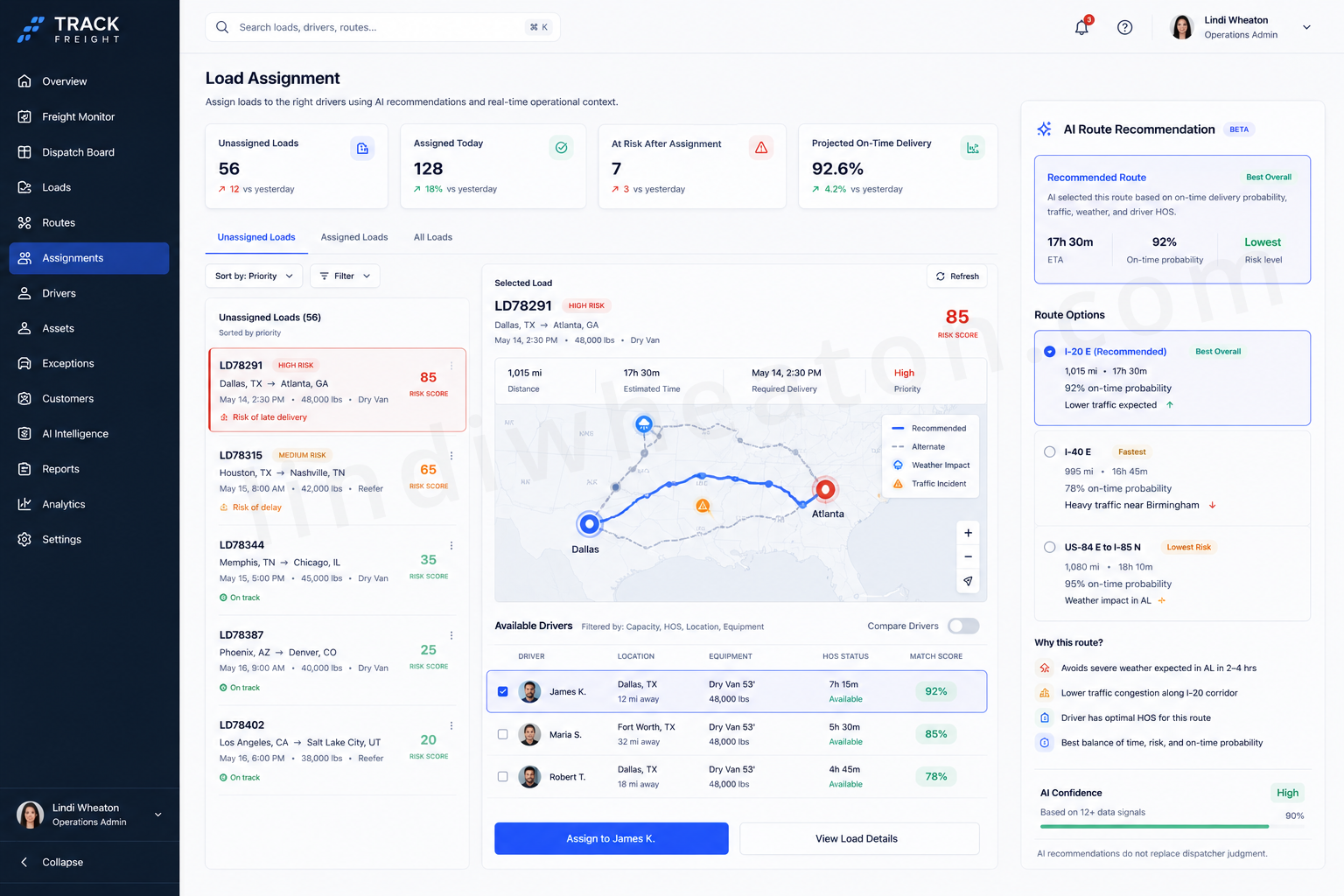
AI Recommendation Panel
Explains why a route, driver match, or next action is suggested.
Priority Queue
Ranks work by urgency, delivery risk, missing context, and operational impact.
Creating a clearer view of freight movement, risk, and next action
Shipment Visibility
Freight status, route movement, customer impact, and operational ownership in one shared view.
Priority Signals
Status indicators help users identify delayed, unassigned, inactive, and at-risk freight.
Workflow Ownership
The interface clarifies who owns the next step and where escalation may be needed.
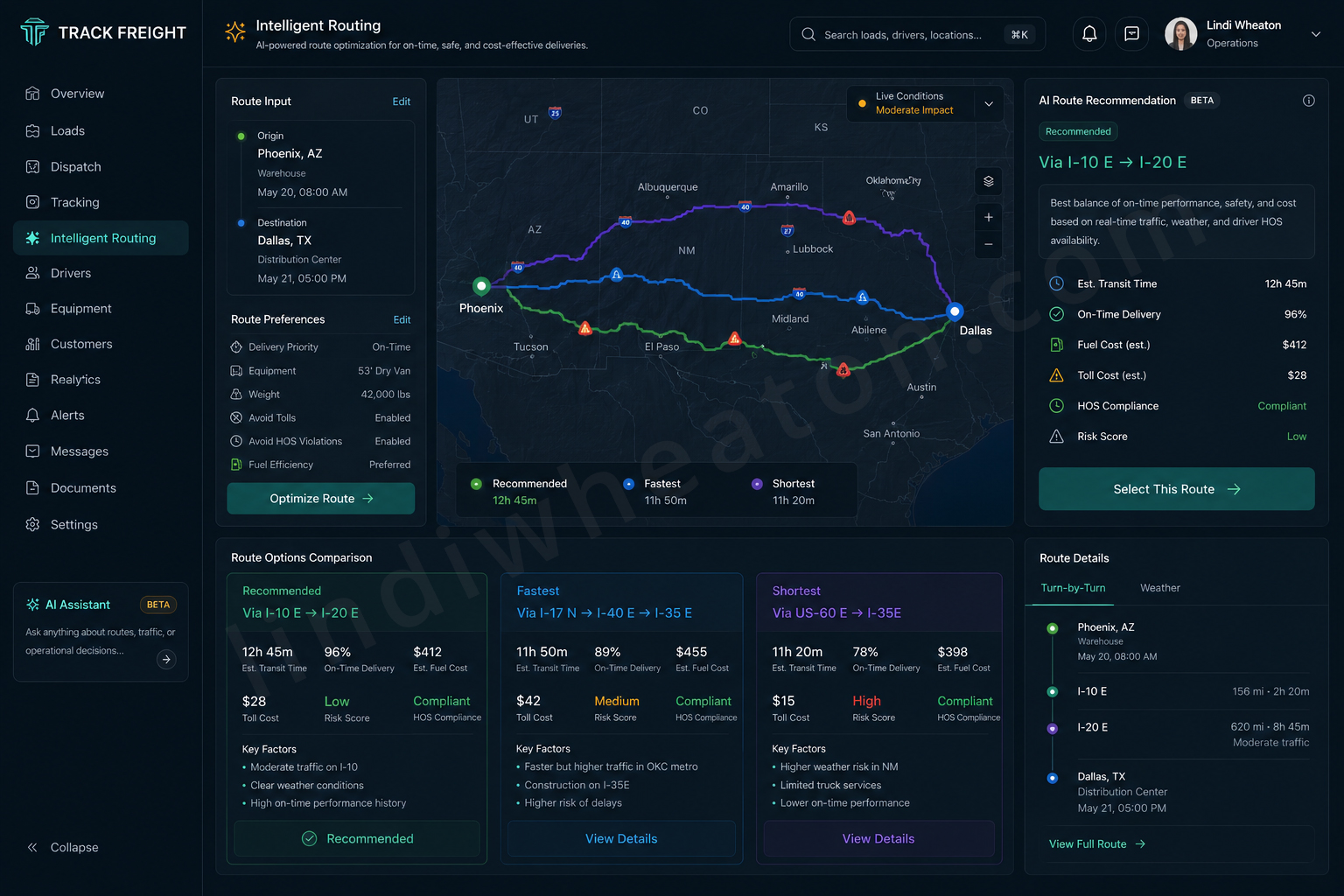
Intelligent routing as a decision-support layer
Routing is treated as a planning workflow, not a static map.
Designing a foundation for smarter freight workflows
Track Freight explores how intelligent product patterns could help teams prioritize work, identify risk, recommend actions, and reduce manual decision fatigue.
Intelligent product opportunities
- Smart queues: prioritize late, unassigned, high-risk, or missing-document freight.
- Routing intelligence: surface delays, bottlenecks, and route conflicts earlier.
- Recommended matches: support driver-load pairing based on location, timing, equipment, and risk.
- Workflow nudges: guide users toward the next best action during time-sensitive work.
Where the platform could evolve next
Routing Intelligence
Continuously evaluate route conditions and recommend alternatives as traffic, weather, delivery windows, and operational constraints change.
Predictive Alerts
Surface delivery risk, assignment conflicts, missing documents, delayed movement, and exceptions before service is impacted.
AI Recommendations
Support load assignment, prioritization, exception handling, and route planning through recommendations users can understand and trust.
What this product exploration demonstrates
Product Thinking
- Frames freight operations as a decision-support problem.
- Connects user needs with operational visibility and business impact.
- Shows how complex workflows can become clearer and more actionable.
Enterprise UX
- Uses scalable dashboard, table, filter, status, and workflow patterns.
- Supports multi-role visibility across transportation operations.
- Balances dense data with clear hierarchy and action paths.
AI-Ready Systems
- Explores intelligent prioritization and routing recommendations.
- Creates a foundation for predictive alerts and workflow nudges.
- Positions the product around operational intelligence and future-state systems.
Designing products for complex operational work
I design enterprise platforms, workflow-heavy products, intelligent systems, and analytics-informed interfaces that improve visibility, reduce friction, and support better decision-making across complex environments.